More and more customers ask an AI assistant before they search: “Who’s the best dentist near me?”, “Which pool service in Sacramento do people like?”. ChatGPT, Claude, Gemini and Perplexity answer by reading the web, and what other people say about a business, its reviews, is a big part of why they recommend one over another. So it matters a lot whether they can read the reviews on your own website. Most of the time, they can’t.
What a visitor sees, and what an AI crawler sees
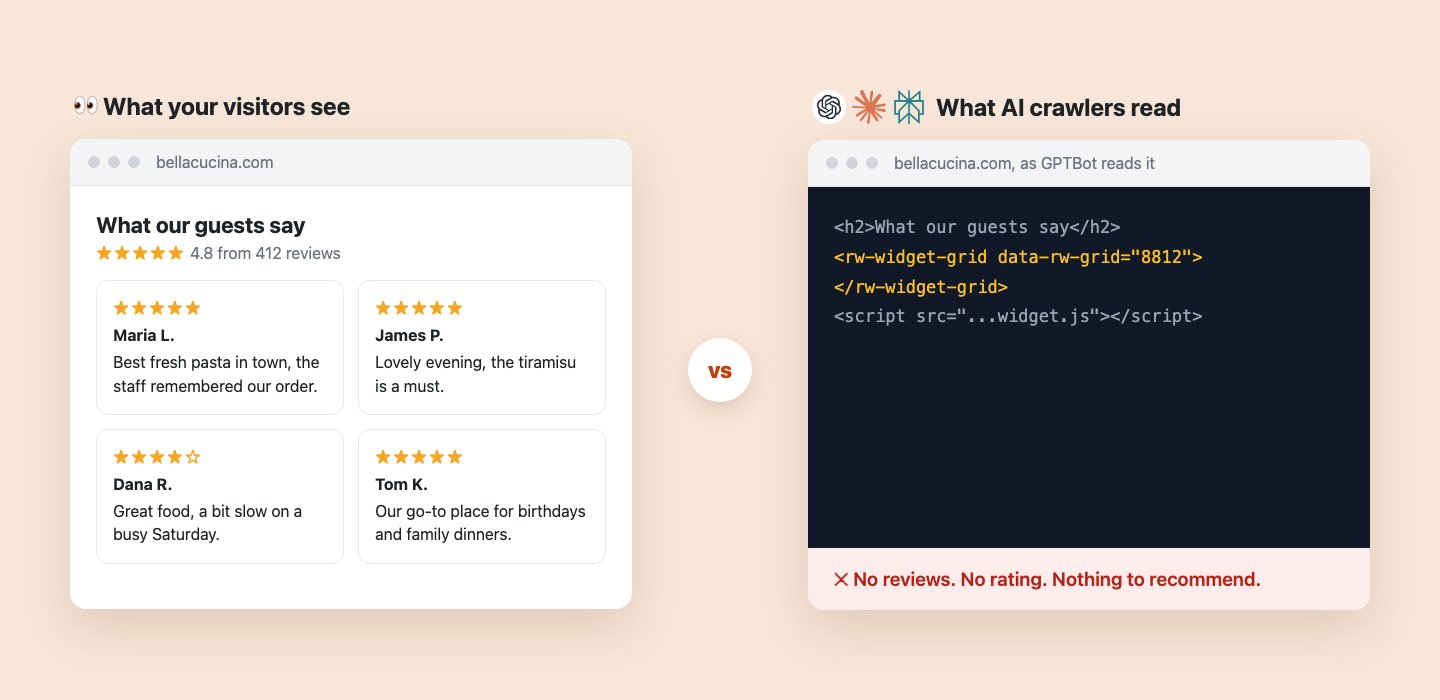
Review widgets, ours included, are built with JavaScript. The page your server sends contains an empty placeholder; the visitor’s browser then runs the widget script, fetches the reviews and draws them. People see a nice grid of five-star reviews.
The crawlers that feed AI assistants (GPTBot for ChatGPT, ClaudeBot for Claude, PerplexityBot for Perplexity) read the page your server sends and don’t run the script. We checked by fetching sites with widgets as each of these crawlers: the reviews weren’t there, and neither was the rating.
What our guests say ★★★★★ 4.8 from 412 reviews
<h2>What our guests say</h2>
<rw-widget-grid data-rw-grid="8812">
</rw-widget-grid>
<script type="module" src="...rw-widget-grid.js"></script>
Same page, two readers. The reviews only exist after the script runs.
This isn’t specific to one platform or one widget style. Anything loaded by JavaScript after the page arrives is invisible to these crawlers.
Your widgets are still working, and Google still reads them. Search engines like Google and Bing run JavaScript, so they see your widget reviews just as visitors do. Nothing is broken and there’s nothing to replace. The gap is only with the crawlers behind AI assistants, which increasingly answer from their own crawls, so your reviews on Google don’t automatically help your own website there.
There are two fixes, and you can use both: a setting in the WordPress plugin that puts your reviews in the page code, and a hosted public review page that works whatever your website runs on.
Fix 1, on WordPress: let AI read your reviews
Version 6.2 of the Repuso WordPress plugin adds one setting under Reviews > Widgets > AI and search engines: Let AI read your reviews.
Your widgets load reviews with JavaScript, which ChatGPT, Claude and Perplexity don't run. With this on, each widget also carries its latest 10 reviews as plain text in the page code, hidden from visitors. Visitors see the same widget as today.
One checkbox in the plugin. It's on by default for new installs.
With it on, every widget placed with a shortcode also carries its latest reviews as plain text inside the widget’s own tag, plus your review data (rating and review count, when it’s switched on in the widget’s settings) in the page code:
<rw-widget-grid data-rw-grid="8812">
  <ul>
    <li>5 out of 5 stars. Maria L., Google, Oct 30: Best fresh pasta in town, the staff remembered our order.</li>
    <li>5 out of 5 stars. James P., TripAdvisor, Oct 22: Lovely evening, the tiramisu is a must.</li>
    <li>4 out of 5 stars. Dana R., Facebook, Oct 15: Great food, a bit slow on a busy Saturday.</li>
    ... 7 more
  </ul>
</rw-widget-grid>
<script id="rw-schema" type="application/ld+json">
{"@type": "Restaurant", "name": "Bella Cucina", "aggregateRating": {"ratingValue": 4.8, "reviewCount": 412}}
</script>Visitors still see the regular widget: the list sits inside the widget's tag, which the widget hides and replaces.
A few things worth knowing:
- Visitors see no difference. The text sits inside the widget tag, which stays hidden until the widget loads and then shows the widget instead. No flash, no layout jump.
- It’s the same reviews the widget shows. Nothing extra, nothing hidden from people that bots get to read differently: the latest reviews you already approved for that widget.
- Review data follows your widget settings. The business type and name come from the widget’s schema settings in Repuso, as before. The plugin just puts that data in the page code instead of adding it with JavaScript.
- It’s not about Google stars. Google doesn’t show review stars for reviews a business collects from other sites on its own website. This is for AI assistants and other crawlers reading your reviews.
- It never slows your pages. The plugin keeps a copy of each widget’s reviews for an hour and refreshes it in the background, so visitors never wait on Repuso.
Use the widget shortcodes ([rw_grid id="..."] and friends): widgets pasted as raw embed code keep loading with JavaScript only.
Fix 2, on any website: your public review page
Not on WordPress, or using widgets pasted as embed code? Every Repuso account comes with a hosted public review page, for example bellacucina.repuso.com, or your own domain. It’s built the opposite way from a widget: the reviews, ratings, your replies and the review data (JSON-LD) are all in the HTML the server sends, so AI crawlers and search engines read everything without running a script.
<h1>Bella Cucina reviews</h1>
4.8 out of 5, 412 reviews from Google, TripAdvisor and Facebook
<article>5 out of 5 stars. Maria L., Google: Best fresh pasta in town, the staff remembered our order.
  Reply from Bella Cucina: Thank you Maria, see you soon!</article>
<article>5 out of 5 stars. James P., TripAdvisor: Lovely evening, the tiramisu is a must.</article>
... 410 more, 20 per page
<script type="application/ld+json">
{"@type": "Restaurant", "name": "Bella Cucina", "aggregateRating": {"ratingValue": 4.8, "reviewCount": 412}}
</script>The public review page: all your approved reviews, from every platform, readable by people and crawlers alike.
To set it up:
- In your Repuso dashboard, open Widgets. Your public review page is pinned at the top. Click Edit page to choose which reviews it shows, its headline and colors. It’s on by default.
- Link to it from your website, in the footer or on your About page. AI assistants find the page through your site, so the link matters. On WordPress, the
[rw_review_page_link]shortcode adds it for you. - Watch the card: it counts the page’s views and visits from Google and AI crawlers, so you can see when ChatGPT, Claude and Perplexity start reading it.
On WordPress, the two fixes work together: the plugin’s setting covers the pages your widgets are on, and the review page gives crawlers every review in one place.
Check whether it works
You don’t have to take our word for it. AI Visibility asks ChatGPT, Gemini and Google Maps the questions your customers ask, and shows how often they name your business, who they name instead, and which sites they read. It’s free to check, no account needed. Track it weekly (Claude and Perplexity included) and the trend line marks the day you turned these on, so you can see what changed.
The plugin shows your AI Visibility score in WordPress, next to the fix that helps it most.
Get it
- Already using the plugin? Update to 6.2, then open Reviews > Widgets > AI and search engines and switch it on.
- New to Repuso? Install Reviews Widgets for Google & 50+ platforms from the WordPress plugin directory. The setting is on from the start.
- Not on WordPress? Open Widgets in your Repuso dashboard, set up your public review page and link to it from your site.
- Curious where you stand first? Run a free AI Visibility check.
If you have questions or feedback, we’d love to hear it.